Introduction to Machine Learning
Models, algorithms, and learning from data.
Before you start
Syllabus-checked revision — 22 questions with answers
The core set remains Q1–Q20. Additional answers Q21–Q22 below deepen the syllabus topics that needed more explanation. Expand the syllabus checklist at the end to locate each topic.
Based on the BCAC701B theory syllabus in sem723.pdf. All five modules carry 20 marks and 9 hours each. Worked examples for regression, KNN, Naive Bayes, classification metrics, K-Means and information gain are retained.
How to use: Expand one question at a time. Smaller overlapping questions have been folded into the relevant answer. For a short answer, use the definition and key points; for a longer answer, add the explanation, diagram or worked example. These are syllabus-based study groups, not predictions of the exam paper.
Module 1: Introduction and Preprocessing — 20 marks
Q1. Define ML, explain its types, terminology and applications.
Introduction
Machine Learning algorithms learn in different ways depending on the type of data available and the problem to be solved. Based on the learning method, Machine Learning is mainly classified into three types: Supervised Learning, Unsupervised Learning and Reinforcement Learning.
Diagram loads when you reach it.
Diagram text
flowchart TD
    ML["Machine Learning"] --> S["Supervised<br/>(labelled data)"]
    ML --> U["Unsupervised<br/>(unlabelled data)"]
    ML --> R["Reinforcement<br/>(reward / penalty)"]
    S --> S1["Regression<br/>Classification"]
    U --> U1["Clustering<br/>Association"]
    R --> R1["Game playing<br/>Robotics"]
1. Supervised Learning
Supervised Learning is a type of ML in which the model learns from labelled data, that is, data with both inputs and their correct outputs.
Types:
- Regression: predicts a continuous value, such as house price.
- Classification: predicts a category, such as spam or not spam.
Algorithms: Linear Regression, Logistic Regression, KNN, Naive Bayes, Decision Tree.
Example: A model trained on past emails marked spam or not spam learns to classify new emails.
2. Unsupervised Learning
Unsupervised Learning is a type of ML in which the model learns from unlabelled data and finds hidden patterns or groups on its own.
Types:
- Clustering: grouping similar data points, such as customers with similar buying habits.
- Association: finding items that occur together, such as "people who buy bread also buy butter".
Algorithm: K-Means clustering.
Example: A shop groups its customers into segments based on spending, without any predefined labels.
3. Reinforcement Learning
Reinforcement Learning is a type of ML in which an agent learns by interacting with an environment, receiving rewards for good actions and penalties for bad actions.
Key terms: agent, environment, action, reward, penalty.
Example: A game-playing program learns winning moves by playing many games; a robot learns to walk by trial and error.
Comparison of the Three Types
| Feature | Supervised | Unsupervised | Reinforcement |
|---|---|---|---|
| Data | Labelled | Unlabelled | No fixed dataset; feedback from environment |
| Goal | Predict output | Find patterns or groups | Maximise reward |
| Tasks | Regression, classification | Clustering, association | Decision making |
| Example | Spam detection | Customer segmentation | Game playing |
Memory aid: Supervised = Student with a teacher; Unsupervised = Unguided self-study; Reinforcement = Reward, like training a pet.
Meaning and scope: Machine learning uses data to learn patterns for tasks such as prediction, classification and grouping. A dataset is a collection of observations; a feature is an input variable; a label is a target output; a model is the learned mapping or pattern. Applications include spam filtering, recommendations, fraud detection and demand forecasting. More data helps only when its quality and relevance are suitable.
Q2. Explain the ML workflow and training, validation and testing.
The ML workflow turns a defined prediction problem into a model evaluated on data it did not learn from.
Diagram loads when you reach it.
Diagram text
flowchart TD
    A["Define task and evaluation metric"] --> B["Collect and inspect suitable data"]
    B --> C["Reserve held-out test data"]
    C --> D["Within training / CV folds: fit preprocessing and feature selection"]
    D --> E["Train candidate models"]
    E --> F["Validate and select / tune"]
    F -- "revise using training and validation only" --> D
    F --> G["Evaluate selected pipeline on untouched test data"]
G --> H["Deploy, monitor and review"]- Define the task: Identify the target, prediction time, intended use and evaluation metric.
- Collect and inspect: Check definitions, duplicates, data quality, relevance and whether observations are independent.
- Split appropriately: Reserve test data before fitting transformations or selecting features. A random split may suit independent observations; grouped or chronological data needs a suitable split.
- Preprocess: Fit imputation, encoding and scaling on training data only; apply those learned transformations to validation/test data.
- Select features and fit: Use training data to choose predictors and estimate model parameters.
- Validate: Compare candidate models and tune settings using validation data or cross-validation. Refit the entire preprocessing pipeline within each training fold.
- Test once: Evaluate the chosen pipeline on untouched test data and interpret performance and limitations.
- Deploy and monitor: Apply the same fitted transformations to new inputs; monitor data shifts and predictive performance.
Roles: Training fits parameters; validation supports choices; testing estimates performance after choices are fixed. Split proportions depend on dataset size and structure, rather than a universal percentage.
Example: A student-support classifier should use information available before the intervention, with student records kept in the correct groups. Its worked application is in Q20.
Q3. Explain data types, preprocessing and missing-value handling.
Introduction
Real-world data is usually incomplete, inconsistent and noisy. Data preprocessing is the process of converting raw, messy data into a clean and suitable format before building an ML model. It is one of the most important steps in the ML workflow because the quality of the model depends on the quality of the data.
1. Need for Data Preprocessing
- Missing and incorrect data: Real data often contains missing values, duplicates, errors and outliers.
- Numbers required: Most algorithms work only with numbers, not text labels.
- Different scales: Features such as age (20–60) and salary (20,000–2,00,000) have very different ranges, which can mislead algorithms like KNN.
- Better accuracy: "Garbage in, garbage out" – poor data produces a poor model.
2. Steps of Data Preprocessing
- Data cleaning: Removing duplicates, correcting wrong entries and fixing inconsistent formats.
- Handling missing values: Deleting incomplete rows or filling them with the mean, median or mode.
- Encoding categorical data:
- Label encoding: assigns numbers to categories (Low = 0, Medium = 1, High = 2).
- One-hot encoding: creates a separate 0/1 column for each category.
- Feature scaling:
- Normalisation (Min-Max): brings values into the range 0 to 1 using x' = (x − min) / (max − min).
- Standardisation (Z-score): gives mean 0 and standard deviation 1 using z = (x − mean) / SD.
- Handling outliers: Removing or capping extreme values that can distort the model.
- Feature selection: Keeping only relevant features.
- Splitting data: Dividing data into training and testing sets.
Advantages:
- Improves model accuracy and reliability.
- Reduces errors caused by noisy or inconsistent data.
- Makes training faster and more stable.
Limitations:
- Takes considerable time and effort.
- Wrong choices (such as removing too many rows) can lose useful information.
Example: For ages 20, 30 and 50, Min-Max normalisation of 30 gives (30 − 20) / (50 − 20) = 10 / 30 = 0.33.
Data types and missing values: Data can be numerical (continuous/discrete), categorical (nominal/ordinal), structured, semi-structured or unstructured. Investigate why values are missing. Options include justified deletion, numerical mean/median imputation, categorical mode or an explicit missing category. Fit imputation on training data to avoid leakage; do not fill everything with zero automatically.
Q4. What is feature selection? Explain its importance and methods.
Introduction
A dataset often contains many columns, but not all of them help in prediction. Feature selection is the process of choosing the most relevant input variables (features) and removing irrelevant or redundant ones before training an ML model.
1. Importance of Feature Selection
- Improves accuracy: Removing irrelevant features reduces noise.
- Reduces overfitting: Fewer features make the model less likely to memorise noise.
- Reduces training time: Less data means faster training and less memory.
- Simplifies the model: A model with fewer features is easier to understand and explain.
2. Methods of Feature Selection
- Filter methods: Features are ranked using statistical measures, independent of any model. For example, features with low correlation to the target or almost constant values are removed.
- Wrapper methods: Different subsets of features are tested with a model, and the best subset is kept. Examples include forward selection (adding one feature at a time) and backward elimination (removing one at a time).
- Embedded methods: Feature selection happens during model training. For example, a decision tree automatically chooses features with the highest information gain.
Advantages:
- Better model performance on new data.
- Lower computational cost.
- Easier interpretation of results.
Limitations:
- Wrapper methods can be slow for large datasets.
- Removing a feature wrongly may lose useful information.
Example: To predict a student's marks, "study hours" and "attendance" are useful features, while "roll number" is irrelevant and should be removed.
Module 2: Regression — 20 marks
Q5. Explain simple linear regression, prediction and residuals.
Introduction
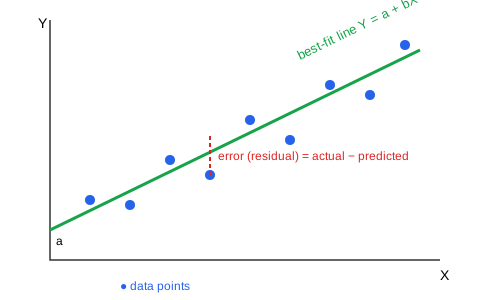
Regression is used when the output to be predicted is a continuous number. Simple Linear Regression is the most basic regression technique. It models the relationship between one independent variable (X) and one dependent variable (Y) using a straight line.
1. Regression Equation
- Y: the dependent (predicted) variable.
- X: the independent (input) variable.
- a (intercept): the value of Y when X = 0.
- b (slope / regression coefficient): the change in Y for a one-unit change in X.
2. Diagram
3. Finding the Line – Least Squares Method
The values of a and b are chosen so that the sum of squared errors between actual and predicted values is the minimum.
4. Assumptions
- Linearity: the relationship between X and Y is linear.
- Independence: errors are independent of each other.
- Constant variance: the spread of errors is similar for all X values.
Advantages:
- Simple to understand and calculate.
- Clearly shows how Y changes with X.
- Fast to train and use.
Limitations:
- Works only for linear relationships.
- Sensitive to outliers.
- Uses only one input variable.
Example: Predicting a person's salary (Y) from years of experience (X).
Prediction and residual: For a fitted line, substitute a new x into the equation to obtain predicted y. A residual is observed y minus predicted y. Regression predicts a numerical value; classification predicts a class. The worked example that follows also covers MAE, MSE and RMSE.
Q6. Numerical: Fit a simple linear regression line, predict a value, and find MAE, MSE and RMSE.
Given:
| X | 1 | 2 | 3 | 4 | 5 |
|---|---|---|---|---|---|
| Y | 2 | 4 | 5 | 4 | 5 |
To find: the regression line Y = a + bX, the predicted Y at X = 6, and MAE, MSE, RMSE.
Formulae:
Solution:
Step 1: Prepare the table.
| X | Y | XY | X² |
|---|---|---|---|
| 1 | 2 | 2 | 1 |
| 2 | 4 | 8 | 4 |
| 3 | 5 | 15 | 9 |
| 4 | 4 | 16 | 16 |
| 5 | 5 | 25 | 25 |
| ΣX = 15 | ΣY = 20 | ΣXY = 66 | ΣX² = 55 |
n = 5, mean of X = 15 / 5 = 3, mean of Y = 20 / 5 = 4.
Step 2: Calculate the slope b.
b = (5 × 66 − 15 × 20) / (5 × 55 − 15²) = (330 − 300) / (275 − 225) = 30 / 50 = 0.6
Step 3: Calculate the intercept a.
a = 4 − 0.6 × 3 = 4 − 1.8 = 2.2
Regression line: Y = 2.2 + 0.6X
Step 4: Predict Y when X = 6.
Y = 2.2 + 0.6 × 6 = 5.8
Step 5: Calculate the errors.
| X | Actual Y | Predicted Ŷ | Error (Y − Ŷ) | Absolute error | Squared error |
|---|---|---|---|---|---|
| 1 | 2 | 2.8 | −0.8 | 0.8 | 0.64 |
| 2 | 4 | 3.4 | 0.6 | 0.6 | 0.36 |
| 3 | 5 | 4.0 | 1.0 | 1.0 | 1.00 |
| 4 | 4 | 4.6 | −0.6 | 0.6 | 0.36 |
| 5 | 5 | 5.2 | −0.2 | 0.2 | 0.04 |
| Sum | 3.2 | 2.40 |
Step 6: Calculate the metrics.
- MAE = 3.2 / 5 = 0.64
- MSE = 2.40 / 5 = 0.48
- RMSE = √0.48 = 0.693
Answer: Y = 2.2 + 0.6X; predicted Y at X = 6 is 5.8; MAE = 0.64, MSE = 0.48, RMSE = 0.693.
Interpretation: On average, the model's predictions differ from actual values by about 0.64 units. Lower error values indicate a better model.
Q7. Explain multiple regression and compare it with simple regression.
Definition: Multiple Linear Regression predicts one dependent variable Y using two or more independent variables (X₁, X₂, …, Xₙ).
Key points:
- b₀ is the intercept.
- b₁, b₂, … are coefficients showing the effect of each variable when the others are kept constant.
- It gives more accurate predictions when the output depends on several factors.
Example: House price = b₀ + b₁(area) + b₂(number of rooms) + b₃(age of house). If b₁ = 3000, each extra square foot increases the price by ₹3000 when other features stay the same.
Simple versus multiple: Simple regression uses one predictor; multiple regression uses two or more. Both predict a numerical outcome. In a multiple regression coefficient, the interpretation is the expected change in the outcome per unit change in that predictor, holding the other predictors fixed.
Module 3: Classification — 20 marks
Q8. Explain logistic regression and compare it with linear regression.
Introduction
Many real problems need a Yes/No answer, such as whether an email is spam or whether a student will pass. Logistic Regression is a supervised classification algorithm (despite its name) used mainly for binary classification. It predicts the probability that an input belongs to a class and then converts that probability into a class label.
1. Working of Logistic Regression
Step 1 – Linear combination: The inputs are combined into a value z.
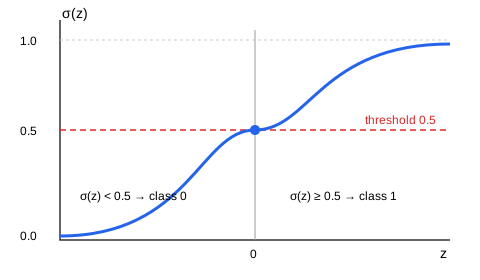
Step 2 – Sigmoid (logistic) function: z is converted into a probability between 0 and 1.
Step 3 – Decision rule (threshold = 0.5):
- If σ(z) ≥ 0.5, predict Class 1 (Yes / Pass / Spam).
- If σ(z) < 0.5, predict Class 0 (No / Fail / Not spam).
2. Sigmoid Curve
Features of the sigmoid curve:
- It is S-shaped.
- When z = 0, σ(z) = 0.5.
- Large positive z gives σ close to 1; large negative z gives σ close to 0.
Advantages:
- Simple, fast and easy to implement.
- Gives probabilities, not just class labels.
- Coefficients are easy to interpret.
Limitations:
- Assumes a linear decision boundary.
- Not suitable for very complex relationships.
- Sensitive to outliers and highly correlated features.
Example: Let z = −4 + 1 × (study hours). For a student who studies 5 hours, z = −4 + 5 = 1. σ(1) = 1 / (1 + e⁻¹) = 0.731. Since 0.731 ≥ 0.5, the prediction is Pass.
Linear versus logistic regression: Linear regression predicts a continuous value; logistic regression models class probability, typically using a sigmoid for binary classification. Apply a decision threshold to convert probability into a predicted class. Despite its name, logistic regression is commonly a classification method.
Q9. Explain the K-Nearest Neighbours (KNN) algorithm.
Introduction
K-Nearest Neighbours (KNN) is one of the simplest supervised learning algorithms. It classifies a new data point by looking at the K closest data points in the training set and assigning the majority class among them. It is based on the idea that similar items lie close to each other.
1. Features of KNN
- Lazy learner: It does not build a model during training; it stores the data and does the work at prediction time.
- Non-parametric: It makes no assumption about the distribution of data.
- Distance-based: It uses a distance measure such as Euclidean distance.
2. Steps of the KNN Algorithm
- Choose the number of neighbours K (usually an odd number such as 3 or 5).
- Calculate the distance from the new point to every training point.
- Sort the distances and select the K nearest points.
- Count the class labels among these K points.
- Assign the majority class to the new point.
Euclidean distance:
3. Diagram (K = 3)
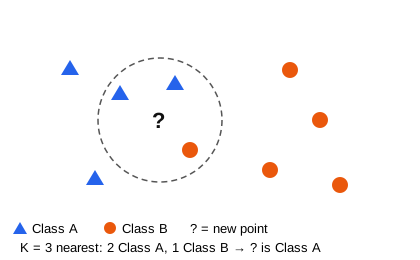
4. Choosing K
- A small K is sensitive to noise.
- A very large K blurs the boundary between classes.
- An odd K avoids ties in binary problems.
Advantages:
- Simple and easy to understand.
- No training time.
- Works for multi-class problems.
Limitations:
- Slow for large datasets, as distances to all points must be computed.
- Requires feature scaling, because features with large values dominate the distance.
- Sensitive to irrelevant features and noise.
Example: A new student with 3 study hours and 2 projects is classified as Pass because 2 of the 3 most similar past students passed.
Q10. Numerical: Classify a new point using KNN (K = 3).
Given: Training data:
| Point | X | Y | Class |
|---|---|---|---|
| A | 1 | 2 | Pass |
| B | 2 | 3 | Pass |
| C | 3 | 1 | Fail |
| D | 6 | 5 | Fail |
| E | 7 | 7 | Fail |
| F | 2 | 1 | Pass |
To find: the class of the new point Q = (3, 2) using K = 3.
Formula: d = √((x₂ − x₁)² + (y₂ − y₁)²)
Solution:
Step 1: Calculate the Euclidean distance from Q.
| Point | Calculation | Distance | Class |
|---|---|---|---|
| A | √((1−3)² + (2−2)²) = √4 | 2.000 | Pass |
| B | √((2−3)² + (3−2)²) = √2 | 1.414 | Pass |
| C | √((3−3)² + (1−2)²) = √1 | 1.000 | Fail |
| D | √((6−3)² + (5−2)²) = √18 | 4.243 | Fail |
| E | √((7−3)² + (7−2)²) = √41 | 6.403 | Fail |
| F | √((2−3)² + (1−2)²) = √2 | 1.414 | Pass |
Step 2: Select the 3 nearest neighbours: C (1.000, Fail), B (1.414, Pass), F (1.414, Pass).
Step 3: Take the majority vote: Pass = 2, Fail = 1.
Answer: The new point Q is classified as Pass.
Q11. Explain the Naive Bayes classifier.
Introduction
Naive Bayes is a probabilistic classifier based on Bayes' theorem. It calculates the probability of each class for the given features and chooses the class with the highest probability. It is widely used for text classification such as spam filtering.
1. Bayes' Theorem
- P(C | X) – Posterior: probability of class C given features X.
- P(X | C) – Likelihood: probability of the features given class C.
- P(C) – Prior: probability of class C in the training data.
- P(X) – Evidence: the same for all classes, so it can be ignored when comparing.
2. Why It Is Called "Naive"
It assumes that all features are independent of each other given the class. This simplifies the calculation:
3. Steps of Naive Bayes Classification
- Calculate the prior probability P(C) of each class.
- Calculate the likelihood of each feature value for each class.
- Multiply the prior and likelihoods for each class.
- Choose the class with the largest product.
Advantages:
- Very fast to train and predict.
- Works well with small datasets.
- Performs well in text classification (spam filtering, sentiment analysis).
Limitations:
- The independence assumption is rarely true in real data.
- If one feature has zero probability for a class, the whole product becomes zero.
- Probability estimates may not be very accurate.
Example: A spam filter calculates the probability that an email containing the words "offer" and "free" is spam, compares it with the probability of it being genuine, and labels it with the higher one.
Memory aid: Posterior ∝ Likelihood × Prior – "LP record".
Q12. Numerical: Naive Bayes spam classification.
Given: 10 training emails – 4 Spam, 6 Not spam.
| Word present | Spam (4) | Not spam (6) |
|---|---|---|
| "offer" | 3 | 1 |
| "free" | 2 | 2 |
To find: the class of a new email containing both "offer" and "free".
Formula: P(C | X) ∝ P(C) × P(x₁ | C) × P(x₂ | C)
Solution:
Step 1: Priors. P(Spam) = 4/10 = 0.4; P(Not spam) = 6/10 = 0.6
Step 2: Likelihoods.
- P(offer | Spam) = 3/4 = 0.75; P(free | Spam) = 2/4 = 0.5
- P(offer | Not spam) = 1/6 = 0.1667; P(free | Not spam) = 2/6 = 0.3333
Step 3: Multiply.
- Spam: 0.4 × 0.75 × 0.5 = 0.150
- Not spam: 0.6 × 0.1667 × 0.3333 = 0.0333
Step 4: Compare. 0.150 > 0.0333.
Answer: The email is classified as Spam. (Normalised probability of Spam = 0.150 / (0.150 + 0.0333) = 0.818, about 82%.)
Q13. Explain the confusion matrix and calculate accuracy, precision and recall.
Given: A disease-test model tested on 100 patients:
| Predicted Positive | Predicted Negative | |
|---|---|---|
| Actual Positive | TP = 40 | FN = 10 |
| Actual Negative | FP = 5 | TN = 45 |
To find: accuracy, precision and recall.
Solution:
- Accuracy = (40 + 45) / 100 = 85 / 100 = 0.85 (85%)
- Precision = 40 / (40 + 5) = 40 / 45 = 0.889 (88.9%)
- Recall = 40 / (40 + 10) = 40 / 50 = 0.80 (80%)
Answer: Accuracy = 85%, Precision = 88.9%, Recall = 80%.
Interpretation: The model is correct 85% of the time. When it predicts disease, it is right 88.9% of the time. It detects 80% of actual patients and misses 20%.
Confusion matrix and interpretation: TP = actual positive predicted positive; TN = actual negative predicted negative; FP = actual negative predicted positive; FN = actual positive predicted negative. Accuracy = (TP + TN)/total; precision = TP/(TP + FP); recall = TP/(TP + FN). Accuracy alone can mislead on imbalanced data: predicting every rare case as negative may appear accurate but gives zero recall for the positive class. Choose metrics based on the costs of errors.
Module 4: Clustering and Decision Trees — 20 marks
Q14. Explain K-Means, centroids and clustering versus classification.
Introduction
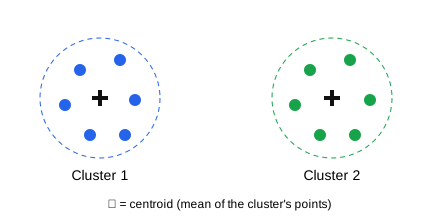
K-Means is the most popular unsupervised clustering algorithm. It divides a dataset into K clusters, where each cluster is represented by its centroid (mean point). Every data point is assigned to the cluster whose centroid is nearest to it.
1. Steps of the K-Means Algorithm
- Choose K: Decide the number of clusters to form.
- Initialise centroids: Select K data points randomly as initial centroids.
- Assign points: Assign each data point to the nearest centroid using Euclidean distance.
- Update centroids: Recalculate each centroid as the mean of all points assigned to it.
- Repeat: Repeat steps 3 and 4 until the centroids stop changing (convergence) or a maximum number of iterations is reached.
2. Flowchart
Diagram loads when you reach it.
Diagram text
flowchart TD
    A["Choose K"] --> B["Initialise K centroids"]
    B --> C["Assign each point to the nearest centroid"]
    C --> D["Recompute centroids"]
    D --> E{"Centroids changed?"}
    E -- Yes --> C
    E -- No --> F["Final clusters"]
3. Clusters with Centroids (K = 2)
Advantages:
- Simple and easy to implement.
- Fast and efficient for large datasets.
- Results are easy to interpret.
Limitations:
- K must be chosen in advance.
- Results depend on the initial centroids.
- Sensitive to outliers.
- Works best for round, similar-sized clusters.
Example: A telecom company uses K-Means with K = 3 to group customers into low, medium and high data users, and designs a separate plan for each group.
Centroid and comparison: A K-Means centroid is the component-wise mean of its assigned points. Clustering discovers groups without supplied class labels; classification learns from labelled examples. K-Means is sensitive to scaling, initial centres and outliers, so preparation and interpretation matter.
Q15. Numerical: Apply K-Means (K = 2) to the data 2, 4, 10, 12, 3, 20, 30, 11, 25. Initial centroids: C1 = 4, C2 = 12.
Given: Data = 2, 4, 10, 12, 3, 20, 30, 11, 25; K = 2; C1 = 4, C2 = 12.
To find: the final clusters and centroids.
Formula: Distance in 1D = |x − centroid|; new centroid = mean of points in the cluster.
Solution:
Iteration 1 (C1 = 4, C2 = 12):
- Cluster 1: {2, 4, 3}
- Cluster 2: {10, 12, 20, 30, 11, 25}
- New C1 = (2 + 4 + 3) / 3 = 3
- New C2 = (10 + 12 + 20 + 30 + 11 + 25) / 6 = 108 / 6 = 18
Iteration 2 (C1 = 3, C2 = 18):
- 10 → |10 − 3| = 7, |10 − 18| = 8 → Cluster 1
- 11 → 8 vs 7 → Cluster 2; 12 → 9 vs 6 → Cluster 2
- Cluster 1: {2, 4, 10, 3}; Cluster 2: {12, 20, 30, 11, 25}
- New C1 = 19 / 4 = 4.75; New C2 = 98 / 5 = 19.6
Iteration 3 (C1 = 4.75, C2 = 19.6):
- 11 → 6.25 vs 8.6 → Cluster 1; 12 → 7.25 vs 7.6 → Cluster 1
- Cluster 1: {2, 4, 10, 12, 3, 11}; Cluster 2: {20, 30, 25}
- New C1 = 42 / 6 = 7; New C2 = 75 / 3 = 25
Iteration 4 (C1 = 7, C2 = 25): the clusters remain the same, so the centroids do not change. The algorithm has converged.
Answer: Cluster 1 = {2, 3, 4, 10, 11, 12} with centroid 7; Cluster 2 = {20, 25, 30} with centroid 25.
Q16. Explain decision-tree structure and construction.
Introduction
A decision tree is a supervised learning model shaped like an upside-down tree. It makes decisions by asking a series of questions about features and following the branches according to the answers. Decision trees are used for both classification and regression, and are popular because they are easy to understand.
1. Parts of a Decision Tree
- Root node: The top node of the tree, representing the first and best splitting feature.
- Internal (decision) node: A node that tests a feature and splits the data further.
- Branch (edge): A link representing an outcome of a test (for example, Sunny, Overcast, Rain).
- Leaf (terminal) node: The final node that gives the class label or decision.
2. Diagram (Play Tennis example)
Diagram loads when you reach it.
Diagram text
flowchart TD
    O{"Outlook<br/>(root node)"} -- Sunny --> H{"Humidity"}
    O -- Overcast --> Y1(["YES"])
    O -- Rain --> W{"Wind"}
    H -- High --> N1(["NO"])
    H -- Normal --> Y2(["YES"])
    W -- Strong --> N2(["NO"])
    W -- Weak --> Y3(["YES"])
3. How a Decision Tree Makes a Prediction
Start at the root node, answer the question, follow the matching branch, and continue until a leaf node is reached. For example, if Outlook = Sunny and Humidity = Normal, then Play = Yes.
Advantages:
- Easy to understand, visualise and explain.
- Handles both numerical and categorical data.
- Needs little data preprocessing (no scaling required).
Limitations:
- Can overfit if the tree grows too deep.
- Small changes in data can produce a very different tree.
- May be biased towards features with many values.
Example: A bank uses a decision tree to approve loans by checking income, credit history and existing loans step by step.
Tree construction: Start with the training set, evaluate candidate splits, choose a useful split, partition the data and repeat recursively. Stop at a pure node or a chosen stopping criterion; assign a leaf prediction. ID3 uses information gain; other tree algorithms may use different criteria. Restricting depth or pruning can reduce overfitting.
Q17. Numerical: Calculate entropy and information gain, and choose the root node.
Given: 14 days of data, Play = Yes: 9, No: 5.
| Attribute | Value | Yes | No | Total |
|---|---|---|---|---|
| Outlook | Sunny | 2 | 3 | 5 |
| Outlook | Overcast | 4 | 0 | 4 |
| Outlook | Rain | 3 | 2 | 5 |
| Wind | Weak | 6 | 2 | 8 |
| Wind | Strong | 3 | 3 | 6 |
To find: Gain(Outlook) and Gain(Wind), and the root node.
Formulae: Entropy(S) = −p₊ log₂ p₊ − p₋ log₂ p₋; Gain(S, A) = Entropy(S) − Σ (|Sᵥ| / |S|) Entropy(Sᵥ)
Solution:
Step 1: Entropy of the whole set S (9 Yes, 5 No).
Entropy(S) = −(9/14) log₂(9/14) − (5/14) log₂(5/14) = 0.410 + 0.530 = 0.940
Step 2: Entropy of each Outlook value.
- Sunny (2, 3): −(2/5) log₂(2/5) − (3/5) log₂(3/5) = 0.971
- Overcast (4, 0): pure set = 0
- Rain (3, 2): 0.971
Step 3: Gain(Outlook).
Weighted entropy = (5/14)(0.971) + (4/14)(0) + (5/14)(0.971) = 0.347 + 0 + 0.347 = 0.694
Gain(Outlook) = 0.940 − 0.694 = 0.247
Step 4: Gain(Wind).
- Weak (6, 2): −(6/8) log₂(6/8) − (2/8) log₂(2/8) = 0.811
- Strong (3, 3): 1.000
Weighted entropy = (8/14)(0.811) + (6/14)(1.000) = 0.464 + 0.429 = 0.892
Gain(Wind) = 0.940 − 0.892 = 0.048
Answer: Since Gain(Outlook) = 0.247 > Gain(Wind) = 0.048, Outlook is selected as the root node. The Overcast branch becomes a leaf (Yes) because its entropy is 0.
Module 5: Evaluation and Applications — 20 marks
Q18. Explain overfitting, underfitting, generalisation, bias and variance.
Introduction
The main goal of a Machine Learning model is to perform well on new, unseen data. A model can fail in two opposite ways: by learning too much from the training data (overfitting) or by learning too little (underfitting). The ideal model has a good fit between the two.
1. Overfitting
Overfitting occurs when a model learns the training data too well, including its noise and random errors. It gives high training accuracy but low test accuracy.
Causes:
- The model is too complex (for example, a very deep decision tree).
- The training data is too small.
- There are too many features.
Example: A student who memorises answers but cannot solve new questions.
2. Underfitting
Underfitting occurs when a model is too simple to learn the real pattern in the data. It gives low accuracy on both training and test data.
Causes:
- The model is too simple (for example, a straight line for curved data).
- Important features are missing.
- The model is not trained enough.
Example: A student who has not studied enough to answer even familiar questions.
3. Good Fit
A good-fit model captures the true pattern and performs well on both training and test data.
Diagram:
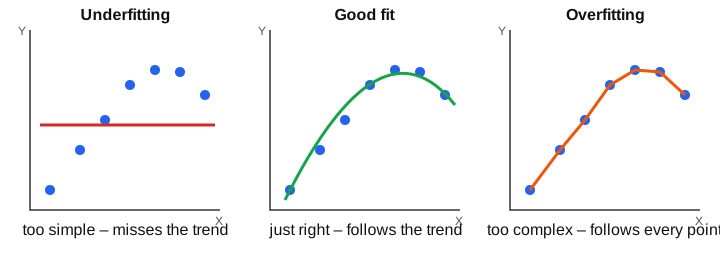
Comparison
| Basis | Underfitting | Good fit | Overfitting |
|---|---|---|---|
| Training accuracy | Low | High | Very high |
| Test accuracy | Low | High | Low |
| Model complexity | Too simple | Right | Too complex |
| Also called | High bias | Balanced | High variance |
4. Remedies
For overfitting:
- Use more training data.
- Remove unnecessary features (feature selection).
- Use a simpler model (limit tree depth or prune the tree).
- Use cross-validation.
For underfitting:
- Use a more complex model.
- Add more useful features.
- Train the model longer.
Memory aid: Overfitting = over-memorising; Underfitting = under-studying.
Generalisation, bias and variance: Generalisation is performance on unseen data from the target setting. Underfitting is often associated with high bias; overfitting with excessive sensitivity to the training sample (high variance). Compare training and validation performance rather than judge only the training score.
Q19. Explain model validation and compare hold-out with K-fold cross-validation.
Introduction
Testing a model on a single train–test split may give misleading results, because the score depends on which records happened to fall in the validation fold. Cross-validation solves this by splitting the data several times, so that every record is used for both training and validation. K-fold cross-validation is the most common form.
1. Steps of K-Fold Cross-Validation
- Divide the data: Split the dataset into K equal parts (folds), for example K = 5.
- train and validate: Use one fold as the validation fold and the remaining K − 1 folds for training.
- Record the score: Evaluate the model and note its score.
- Repeat: Repeat the process K times, each time using a different fold as the validation fold.
- Average: The final performance = average of the K scores.
2. Diagram (K = 5)
| Round | Fold 1 | Fold 2 | Fold 3 | Fold 4 | Fold 5 | Result |
| 1 | VALIDATE | train | train | train | train | score 1 |
| 2 | train | VALIDATE | train | train | train | score 2 |
| 3 | train | train | VALIDATE | train | train | score 3 |
| 4 | train | train | train | VALIDATE | train | score 4 |
| 5 | train | train | train | train | VALIDATE | score 5 |
Final score = average of the 5 scores.
Advantages:
- Uses all data for both training and validation.
- Gives a more reliable estimate of performance.
- Helps detect overfitting and compare models fairly.
Limitations:
- Takes K times more computation than a single split.
- Can be slow for very large datasets or complex models.
Example: Fold scores of 80%, 85%, 82%, 78% and 85% give an average accuracy of 410 / 5 = 82%.
Hold-out versus cross-validation: Hold-out uses one split and is cheaper but depends on that split. K-fold cross-validation repeats fitting across folds and averages validation performance. It supports selection and tuning; retain an untouched test set for final evaluation when appropriate. Temporal data needs time-respecting splits.
Avoid leakage: Fit scaling, imputation and feature selection separately within each training fold. Use the validation fold only to evaluate that fitted pipeline. The final test set is separate from the folds used for choosing the model. Reference: scikit-learn guidance on data leakage
Q20. Case study: Predicting whether a student will pass, using the full ML workflow.
Problem: Identify students at risk of failing early enough to offer support. Define the positive class as at risk / fail = 1, and pass = 0, so recall measures how many genuinely at-risk students are found.
- Define the prediction time: Use only information available before support would be offered. Exclude final marks and other information learned after the outcome.
- Collect suitable historical data: Features may include earlier attendance, assignment performance and study habits; the historical outcome supplies the label. Review data quality, permission and relevance.
- Reserve evaluation data: Split before fitting learned preprocessing. Keep repeated records for one student together; use time-respecting splits if predicting later cohorts.
- Fit preprocessing on training data: Learn missing-value replacements, encodings, scaling and feature selection using training data only. Apply the fitted transformations to held-out data.
- Compare models: Compare logistic regression, KNN and a decision tree using suitable cross-validation within the training portion. Fit the entire preprocessing/model pipeline separately in each fold.
- Choose the metric and threshold: For fail = 1, recall = TP/(TP + FN) measures how many at-risk students are detected. Also examine precision and false alarms; a model predicting everyone is at risk has high recall but little practical value.
- Control overfitting: Use validation performance to choose hyperparameters such as tree depth; do not repeatedly tune against the final test set.
- Final evaluation: Evaluate the selected pipeline once on the untouched test set. Report the confusion matrix, precision, recall and accuracy, with limitations.
- Use and monitor: Use predictions to support human review and assistance, protect student data, and monitor performance when cohorts change.
Illustrative result: Of 20 genuinely at-risk students, finding 16 gives recall = 16/20 = 80%. If 25 students were flagged, precision = 16/25 = 64%. These are example numbers, not reported results from a real college.
Other applications: Regression predicts numerical outcomes such as demand; classification predicts labels such as spam/not spam; clustering discovers groups such as similar customer profiles. Choose the method and metric to match the objective.
Additional answers for syllabus depth
These expand topics that were too brief in the condensed set. Existing question numbers are unchanged.
Q21. Explain MAE, MSE and RMSE. Compare them.
Introduction
After training a regression model, we must measure how close its predictions are to the actual values. Mean Absolute Error (MAE), Mean Squared Error (MSE) and Root Mean Squared Error (RMSE) are the three most common evaluation metrics for regression. For all three, lower values are better, and 0 means perfect prediction.
1. Mean Absolute Error (MAE)
MAE is the average of the absolute differences between actual and predicted values.
Features:
- It is in the same unit as the data.
- Its penalty grows linearly with the magnitude of each error.
- It is easy to understand.
2. Mean Squared Error (MSE)
MSE is the average of the squared differences between actual and predicted values.
Features:
- Squared errors are non-negative.
- Large errors are penalised heavily.
- Its unit is the square of the data's unit, which is harder to interpret.
3. Root Mean Squared Error (RMSE)
RMSE is the square root of MSE.
Features:
- It brings the error back to the same unit as the data.
- Like MSE, it gives more weight to large errors.
- It is commonly used when larger errors deserve greater emphasis.
Comparison of the Three Metrics
| Basis | MAE | MSE | RMSE |
|---|---|---|---|
| Formula | Average of absolute errors | Average of squared errors | Square root of MSE |
| Unit | Same as Y | Square of Y's unit | Same as Y |
| Effect of large errors | Linear penalty | Strongly penalised | Strongly penalised |
| Ease of understanding | Easiest | Hard | Easy |
| Best used when | Linear error penalty is suitable | Mathematical optimisation | Large errors are serious |
Example: For actual values 2, 4, 5, 4, 5 and predictions 2.8, 3.4, 4.0, 4.6, 5.2, MAE = 0.64, MSE = 0.48 and RMSE = 0.693.
Memory aid: Absolute = Average distance; Squared = Severely punishes big errors; Root = brings the unit Right back.
Fair comparison: Compare models on the same held-out data, outcome scale and metric. Lower training error alone does not establish better generalisation. RMSE is at least MAE on the same set of residuals; there is no universal threshold for a “good” value.
Q22. Explain entropy, information gain and decision-tree construction using ID3.
Entropy: A measure of class impurity. For class proportions p₁,…,pₖ, H(S) = −Σ pᵢ log₂(pᵢ), treating 0 log₂0 as 0. A pure node has entropy 0; two equally common classes have entropy 1 bit.
Information gain: The parent entropy minus the weighted average entropy of its child subsets. A useful split reduces uncertainty about the class. Weight each child by its fraction of the records; do not average child entropies equally unless the children are equally sized.
Introduction
A decision tree must decide which attribute to test at each node. The ID3 (Iterative Dichotomiser 3) algorithm, developed by Ross Quinlan, builds a decision tree top-down by choosing, at every step, the attribute with the highest information gain.
1. Steps of the ID3 Algorithm
- Calculate entropy: Find the entropy of the whole dataset based on the target classes.
- Calculate information gain: For each attribute, calculate the information gain of splitting on it.
- Select the root node: Choose the attribute with the highest gain as the root node.
- Create branches: Create a branch for each value of that attribute and divide the data into subsets.
- Process each subset:
- If all examples belong to one class (entropy = 0), make it a leaf node.
- If no attributes are left, make a leaf with the majority class.
- Otherwise, repeat steps 1–4 on the subset using the remaining attributes.
- Stop: The process ends when every branch ends in a leaf node.
2. General tree-complexity controls (extensions beyond basic ID3)
- Maximum depth: limit how deep the tree can grow.
- Minimum samples: require a minimum number of records before splitting.
- Pruning: remove branches that add little accuracy, to reduce overfitting.
Advantages:
- Produces simple, readable rules.
- Selects the most informative features automatically.
- Fast to build for small and medium datasets.
Limitations:
- Can overfit without depth control or pruning.
- Original ID3 handles only categorical attributes.
- Biased towards attributes with many values.
Example: In the worked example in Q17, Outlook has greater gain than Wind and becomes the root among those candidates; Overcast is a pure Yes leaf. Further splits require the actual records in each remaining subset.
Memory aid: "Entropy → Gain → Pick → Split → Repeat" (E-G-P-S-R).
Syllabus coverage checklist
Checked against the supplied sem723.pdf theory syllabus on . This maps the listed content topics to answers; it is not a prediction of exam questions or marks for any individual answer.
| Module | Listed syllabus topics | Answers |
|---|---|---|
| M1 | Meaning, scope, types and applications of ML | Q1, Q20 |
| M1 | Workflow; training/testing and validation | Q2, Q19–Q20 |
| M1 | Data types, preprocessing, transformation and missing values | Q3 |
| M1 | Feature selection | Q4 |
| M2 | Simple linear regression, model prediction and residuals | Q5–Q6 |
| M2 | Multiple regression: basic idea | Q7 |
| M2 | MAE, MSE, RMSE: calculation and interpretation | Q6, Q21 |
| M3 | Logistic regression | Q8 |
| M3 | KNN and Naive Bayes, including worked examples | Q9–Q12 |
| M3 | Confusion matrix, accuracy, precision and recall | Q13 |
| M4 | K-Means and centroid concept, including worked iteration | Q14–Q15 |
| M4 | Decision-tree structure, entropy, information gain and tree construction | Q16–Q17, Q22 |
| M5 | Model validation and basic cross-validation | Q19 |
| M5 | Overfitting and underfitting | Q18 |
| M5 | Applications and case study | Q1, Q20 |