BUILD LOG / N8N AUTOMATION
n8n Job Search Automation: A Free Job Hunting Assistant
My free n8n job search automation finds and ranks jobs, tracks applications in Google Sheets, and turns Gmail replies into a daily follow-up digest.
Download the PDF
Full stack developer, Kolkata · sayanpaul.in
Written from my own job hunt, November 2026
I'm a final year BCA student from Kolkata, graduating in 2027, and I'm applying for developer roles and internships. In one evening I turned my messy job search into two automations that run on their own: one finds and ranks jobs twice a day, the other reads my inbox and tells me who to follow up with. It costs nothing to run and it never applies to anything without me.
Why I built it
The jobs were never in one place. On a normal day I was checking:
-
LinkedIn job search, filtered to internships and entry level
-
Naukri and a couple of other job sites
-
Four WhatsApp channels that post fresher openings every few hours
-
Remote job boards, for roles open to India
Each source had its own noise. WhatsApp channels repeat the same post, mix in course promotions, and bury the apply link under emojis. LinkedIn shows senior roles even with the entry level filter. And once I applied somewhere, I had no system to remember when to follow up.
I didn't need another job site. I needed one list, ranked for me, that updated itself. So I built it with n8n, a workflow automation tool I already run on my laptop in Docker.
How my n8n job search automation works
The system is two n8n workflows that share one Google Sheet, my Job Tracker. Every job lives there as a row with a score, an apply link and a status I change as I go.
| Workflow | Runs | What it does |
|---|---|---|
| Job Hunter | 8 AM and 6 PM | Collects jobs from 7 sources, scores them, adds only new matches to the sheet |
| Job Inbox Assistant | 9 AM | Reads my Gmail, labels replies, updates the sheet, emails me a morning digest |
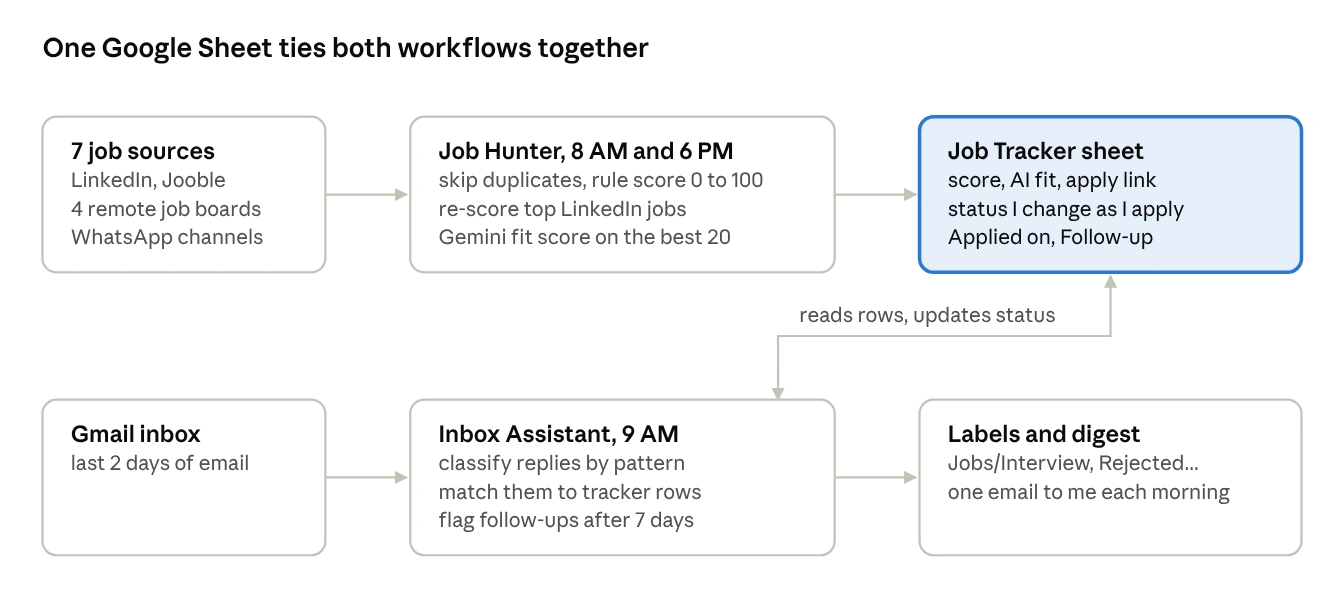
The Job Hunter writes new jobs into the sheet; the Inbox Assistant reads that sheet each morning and writes back status changes from my email.
My daily routine is now short. I read one digest email, open the sheet sorted by score, apply to five to eight jobs and mark them Applied. The rest happens without me.
Everything runs on free tiers: n8n self-hosted in Docker, the Google Sheets and Gmail APIs, Gemini's free tier, and job sources that need no paid key.
Workflow 1: Find and rank jobs with n8n
Twice a day it pulls jobs from seven sources, throws away what doesn't fit, and adds only new matches to the sheet. On its first run it saved 60 matched jobs. The next run skipped those 60 and added 17 new ones.
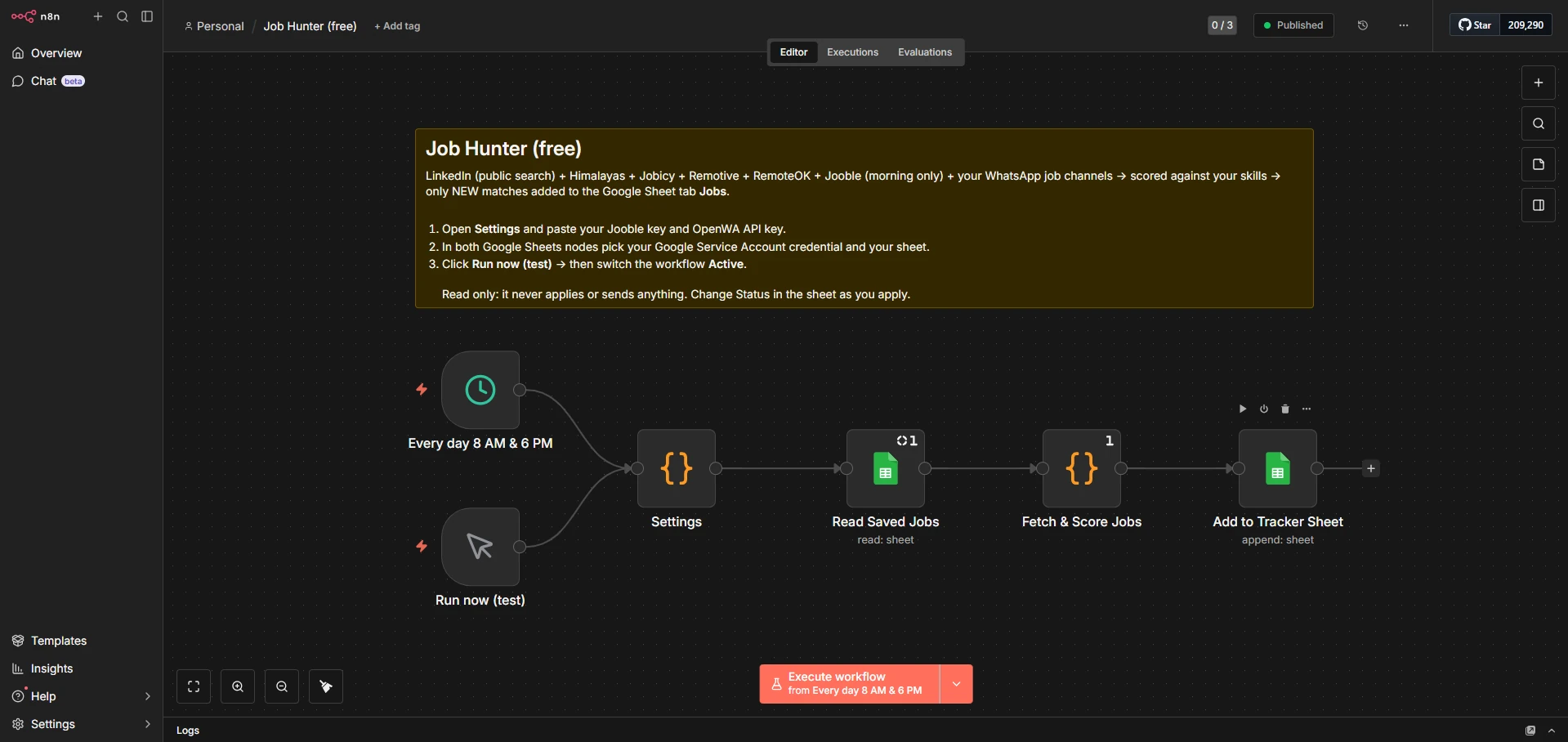 The Job Hunter workflow in n8n. Open the full-size screenshot to inspect the nodes.
Where the jobs come from
| Source | Key needed | What it gives me |
|---|---|---|
| LinkedIn public job search | No | Kolkata and remote India, last 24 hours, internship and entry level |
| Himalayas, Jobicy, Remotive, RemoteOK | No | Remote roles open to India, Asia or worldwide |
| Jooble | Free key | Indian job sites, one search each morning |
| WhatsApp job channels | Self-hosted gateway | Fresher and off-campus posts from the channels I follow |
Two sources needed care. Jooble's free key comes with 500 calls in total, so it runs one search only on the morning run, which stretches it past a year. Adzuna, which I tried first, turned out to give only 25 test calls before asking for a paid plan, so I dropped it.
The WhatsApp channels go through OpenWA, an open source gateway that runs in Docker and talks to WhatsApp Web. It's unofficial, so I linked a spare number, never my main one. The workflow only reads channel posts; it never sends anything.
The steps inside
-
Read the sheet to get every job ID already saved.
-
Fetch from each source inside its own try block, so one failing source never stops the run.
-
Normalise every job into the same shape: title, company, location, link, date, description.
-
Skip duplicates, both jobs already in the sheet and the same job posted by two sources.
-
Score each job from 0 to 100.
-
Fetch full LinkedIn descriptions for the top 25 LinkedIn matches and score them again.
-
Ask Gemini for a fit score on the best 20.
-
Append the new rows to the sheet.
Rule-based job scoring and Gemini AI matching
I kept the main score as plain rules instead of AI, so I can always see why a job ranked where it did.
| Signal | Points |
|---|---|
| Each of my skills found in the job | +6, plus 6 more if it's in the title (max 40) |
| Developer-type title | +20 |
| Fresher friendly: fresher, 0 to N years, intern, junior, 2025 to 2028 batch | +20 |
| Kolkata, remote or hybrid | +10 |
| Posted in the last 24 hours | +5 |
| Non-developer role: sales, BPO, data entry | -50 |
| Asks for 2+ years and never mentions freshers | -25 |
| Senior, lead, manager or architect title | dropped |
Jobs under 40 are not saved. The skill list comes straight from my resume: JavaScript, Python, SQL, React, Next.js, Node.js, Express, FastAPI, PostgreSQL, MongoDB, Supabase, Docker and a few more.
Better LinkedIn matching
LinkedIn's public search only shows a title and company, so at first a React job scored low just because React wasn't in the title. Now the workflow opens the public job page for the 25 most promising LinkedIn results, reads the full description and scores again. When I tested it with a sample React job whose description listed React, Node.js and PostgreSQL, its score went from 67 to 79. It also reads LinkedIn's seniority label and drops anything marked Mid-Senior.
The AI fit score
The rule score is good at filtering, but it can't tell whether a job actually fits my profile. So the best 20 new jobs go to Gemini in one request, along with a short profile written from my resume, including a list of what I don't have yet. Gemini returns a fit score and a one-line reason for each, which land in the AI fit and AI note columns.
Return ONLY a JSON array like [{"n":1,"fit":72,"why":"..."}]
with one entry per job number.
If the free quota runs out, the run still finishes and leaves those two columns empty.
Workflow 2: Track job applications with Gmail and Google Sheets
Finding jobs was only half the problem. The other half was remembering what happened after I applied. Every morning at 9 this workflow reads the last two days of my Gmail next to the tracker sheet and does three things.
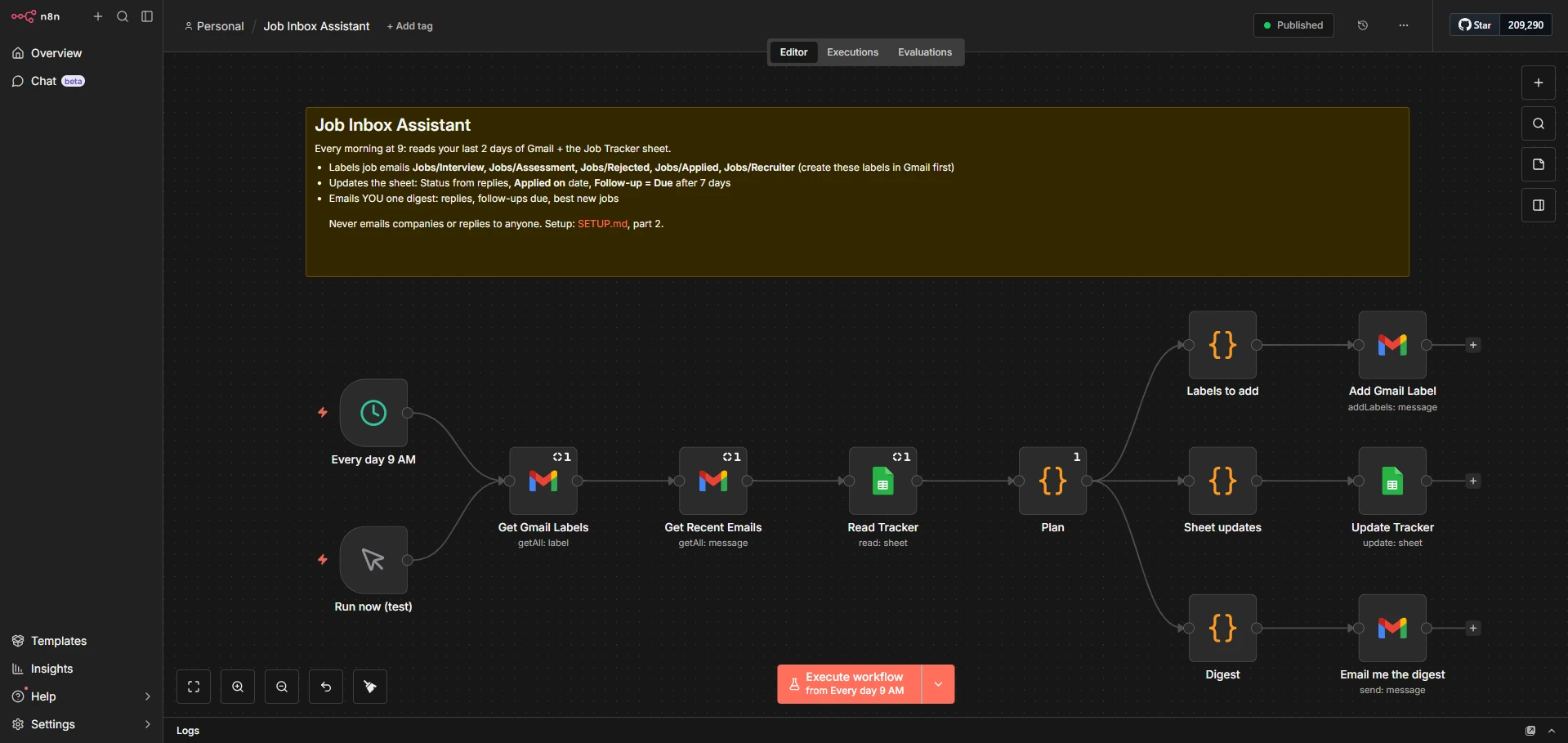 The Inbox Assistant workflow in n8n. Open the full-size screenshot to inspect the branches.
- Labels job emails. Each email is checked against simple patterns and gets a Gmail label:
| Label | Example of what triggers it |
|---|---|
| Jobs/Interview | "schedule a call", "next round", "shortlisted" |
| Jobs/Assessment | "coding test", "HackerRank", "take-home" |
| Jobs/Rejected | "unfortunately", "not moving forward" |
| Jobs/Applied | "thank you for applying", "application received" |
| Jobs/Recruiter | "came across your profile", "would you be interested" |
Rejection is checked first, because rejection emails often thank you for your interview too.
-
Updates the sheet. If an email mentions a company that's in my tracker, that row's Status changes on its own, for example from Applied to Interview. When I mark a row Applied, the next run stamps today's date in Applied on. After 7 days with no reply, the row gets Follow-up = Due.
-
Emails me one digest. Replies that need me, follow-ups due with a short template, and the best new jobs from the last 24 hours, sorted by AI fit. My first digest said "2 replies, 0 follow-ups, 8 new jobs", and the same run had already labelled an HSBC application confirmation as Jobs/Applied.
It never emails a company or replies to anyone. The only email it sends goes to me.
Applications I make outside the sheet, on Naukri or through a referral, still get tracked. I add a row by hand with the title, company, status Applied and a unique ID like manual-companyname, and the follow-up reminders cover it too.
Decisions I'd make again
Number the jobs in the AI prompt, don't send IDs. I learned this on Appliqa, my job search platform: when an LLM has to return results tied to long job IDs, it sometimes copies an ID wrong and the result lands on the wrong job. Here each job is labelled #1 to #20, Gemini answers with "n": 3, and the code maps 3 back to the third job. Short numbers are hard to get wrong.
Rules for filtering, AI for judgement. The rule score is fast, free and explainable, so it does the heavy filtering of hundreds of jobs. Gemini only sees the top 20, where its opinion actually changes what I apply to first.
A service account for Sheets, OAuth for Gmail. A Google service account never expires, so the sheet connection keeps working forever. But a service account can't read a personal inbox, so Gmail uses a normal OAuth login. While the Google app stays in testing mode, that login has to be renewed every 7 days, a 10 second click I've accepted for now.
One failing source never breaks the run. Every source is wrapped in its own try block and logs a line like LinkedIn: 90 | Jooble: FAILED 403. If LinkedIn changes its page tomorrow, the other six sources still fill the sheet.
Two keys for duplicates. Each job is checked by its source ID and by a key made from its title plus company. The first catches the same post seen twice. The second catches the same job posted by LinkedIn and a WhatsApp channel.
Read only by design. Auto-applying on LinkedIn or Naukri breaks their rules and can get an account blocked, and a tailored application beats a mass one anyway. So the automation stops at finding, ranking and reminding. Applying is my job.
n8n workflow problems and how I fixed them
None of this worked the first time. These were the real problems, in the order I hit them.
| Problem | Cause | Fix |
|---|---|---|
| The OpenWA Docker build hung for ages | Building the dashboard from source on my laptop | Pulled the prebuilt image instead of building |
| Node crashed with an "Assertion failed" error on Windows | Calling process.exit() while network sockets were still open | Ended the script by setting process.exitCode and letting it finish |
| WhatsApp found zero channels | The real channel was named "Job Update With FoundtheJob", not "FoundtheJob" | Matched channel names by a normalised substring |
| Adzuna stopped after a few calls | The free key turned out to be 25 test calls | Dropped it for LinkedIn, Himalayas and Jobicy |
| The sheet append failed with empty columns | Picking the sheet from a list reset the column mapping to manual | Switched it back to map automatically |
| Gmail login said "Access blocked" | My email wasn't saved as a test user on the Google app | Added it again and confirmed it saved |
| An HR auto-reply got the Assessment label | It mentioned the word "assignment" | Still on my list: make that rule stricter |
The biggest lesson was to test the whole run, not one step at a time. n8n reuses earlier results when you run a single step, and one of my tests read an empty sheet that had since filled up. I almost "fixed" a bug that wasn't there.
Where it stands
It has only been running for a day, so I won't claim it got me hired. What I can say is what it already does: my tracker holds 78 matched jobs from its first few runs, every one with a score and an apply link, and from now on my mornings start with one email instead of six apps. I'll post an update once there are real results to share.
Limits worth knowing
-
LinkedIn's public job search is not an official API. I keep it to a few spaced-out searches a day, for personal use. It can change or stop working at any time.
-
OpenWA is unofficial too. Use a spare WhatsApp number, never your main one.
-
My laptop has to be awake at 8 AM, 9 AM and 6 PM. A missed run is skipped, though the next run still catches up on the last few days.
-
Remote job boards ask for gentle polling and attribution, so the workflow runs at most twice a day and keeps their original apply links.
What I'll add next
-
A stricter rule for assessment emails, so auto-replies stop getting that label
-
A weekly stats email: jobs found, applied, replies and response rate
-
Tailored resume bullets for the jobs I star, using the same Gemini setup
Get the free n8n workflows and setup guide
The full code, both workflows and a step-by-step setup guide are on GitHub: imsayanpaul/job-hunter-automation. Everything runs on free tiers. Bring your own keys, your own skills list and a spare number for WhatsApp.
If you're a 2027 fresher fighting the same scattered job search, I'd like to hear how you're handling it. You can find me at sayanpaul.in or on LinkedIn.